
Court Calendars in Ohio
An Ohio court calendar lists what is scheduled: arraignments, pretrials, motion hearings, trials, appellate arguments. It may take the form of a daily docket. It may also be a judge's schedule or a portal view. The docket tracks filings and scheduling changes over time. The calendar simply groups events by date, judge, courtroom, or hearing type. The two overlap, yet neither replaces the other.
Every Ohio trial court controls its own settings. Some post a short daily or weekly list. Others reveal a date only through the case record or a judge page. The Ohio Trial Courts directory can route you to official local links, though it is not itself a calendar search. The one statewide hearing search belongs to the Ohio Court of Claims. That search does not list county trial hearings.
No Statewide Trial Calendar in Ohio
Ohio publishes no calendar that combines county trials, hearings, traffic arraignments, and docket calls. Each court carries its own schedule on its local site or judge page. The Supreme Court's oral-argument calendar covers high-court matters only. Each Court of Appeals district handles its own appellate events separately.
A local case docket may show the newest setting. The full schedule, though, could live on a separate calendar. When nothing appears online, use the county directory to reach the court printed on your notice, then ask its clerk or assignment office how to view the public calendar. Note that eStats is a caseload dashboard, not a hearing list.
The Ohio Trial Courts directory links local courts by county. Once you pick a court, see whether its schedule is arranged by judge, courtroom, case number, or date.
Finding an Ohio Court Date
Start with the newest court notice, summons, citation, or docket entry. Write down the case number plus the court and division names. No statewide trial-court lookup exists in Ohio. So the county and court named on the paper decide where to search. If the court's website is unknown, open the state directory. Then choose the county and court tier.
- Check the newest written notice or local docket entry and copy the court, division, case number, date, and time.
- Open the court or clerk's online docket, when available, and look for later entries that may change the date.
- Use the Ohio county directory to reach the correct county court's calendar or daily schedule.
- Read the judge, courtroom, hearing type, and any remote-appearance instructions shown by the local court.
- If the calendar and notice differ, call the court coordinator for the current schedule and the clerk for a filed notice or docket copy.
No online calendar? Ask the clerk about counter access, a courthouse terminal, or a posted daily list. Each option depends on what the local court provides.
Ohio Court of Claims Hearing Search
The Ohio Court of Claims is a narrow statewide exception. Its Odyssey Portal offers a Search Hearings route. The Court also publishes a public calendar dataset. Both cover Court of Claims matters only, not county Common Pleas, Municipal, or County Court hearings. The hearing-search guide lists filters for location, hearing type, search type, judicial officer, and date range. Results can be sorted by case number, case style, hearing date, time, or type.
The Ohio Trial Courts directory links local courts by county. Once you pick a court, see whether its schedule is arranged by judge, courtroom, case number, or date.
The Court of Claims public calendar dataset displays a filter panel beside its calendar view.
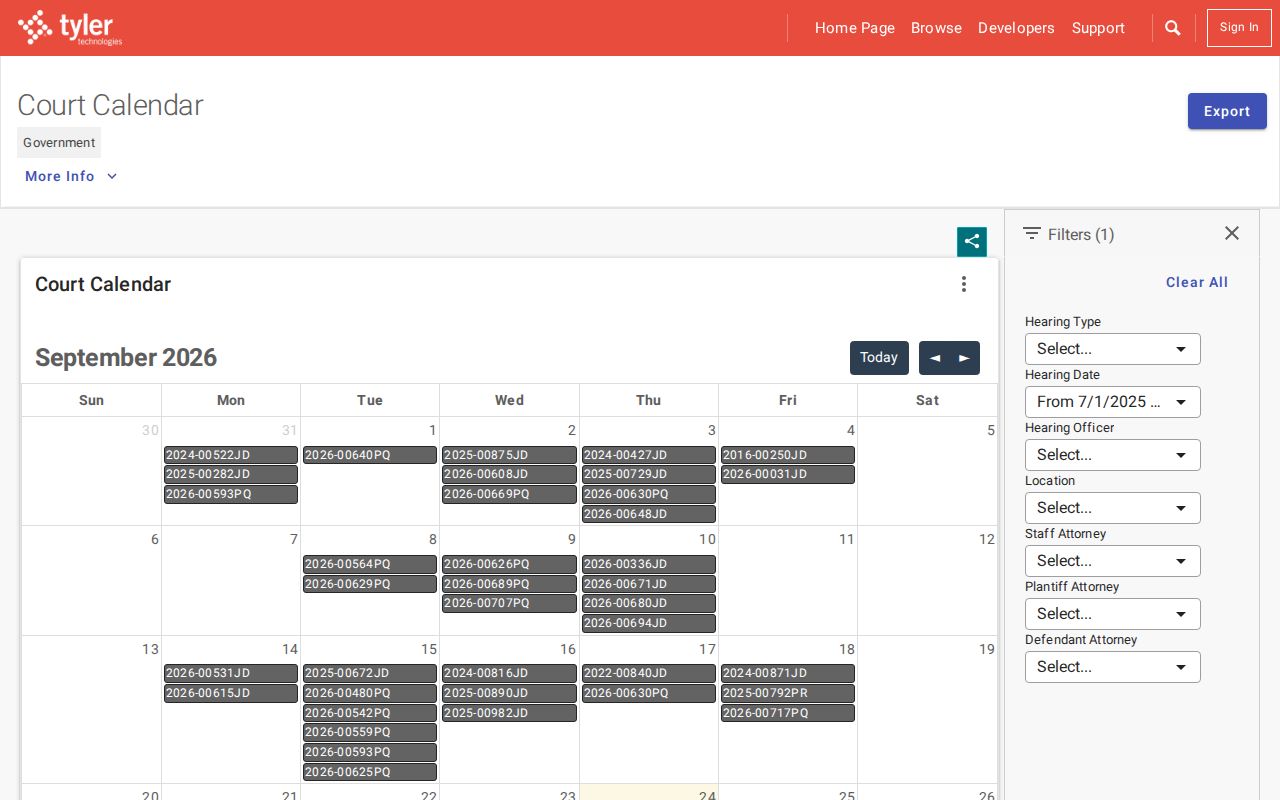
That statewide calendar is court-specific. A county trial setting still comes from the local court that scheduled it.
The Court of Claims is a narrow exception. Its filters only help when the case belongs to that court. The official Odyssey user guide describes filters for hearing date, time, type, case number, and case style. It also covers list and calendar views. Location and judicial-officer filters can narrow a hearing search further. Those fields can locate an event in a Court of Claims matter. They reach no other Ohio trial courts.
The separate public Calendar dataset lists metadata with an August 1, 2026 update. Its date values run from January 5, 2015 through April 7, 2028. That span merely describes the dataset's range. It does not promise that every hearing or later continuance appears for a given case. The Court calls its calendar data real time, but treat an online row as a lead to verify. If nothing appears, check the latest filed notice and ask the court. A blank result is not a cancellation.
The Odyssey Portal also warns that displayed information and documents are not the official court record or certified copies. Use the portal to locate a Court of Claims setting. Then contact the Court's Clerk for a certified record. For a county hearing, these filters will not help. The local court, clerk, or coordinator maintains that schedule through the court's own channels.
Reading an Ohio Court Setting
A setting is only a scheduled event. It does not prove a hearing took place. Compare the date and time against the most recent docket entry or court notice. Local labels vary, and a calendar row can omit a later order, a courtroom change, or remote instructions. If an entry looks unclear, confirm with the court before relying on an older listing.
| Case number | The local identifier; formats differ by county, court, and division. |
|---|---|
| Setting date and time | The scheduled start; check a later docket entry for a changed date. |
| Court and courtroom | The court, judge, division, room, or remote link when the local system displays it. |
| Hearing type | A label such as pretrial, motion hearing, trial, review, or traffic hearing; exact practice varies. |
| Setting status | May show a current listing, but a later notice or order can supersede it. |
| Case caption | Identifies the case parties, subject to privacy and restricted-record rules. |
Ohio Hearing Labels Vary by Court
Ohio trial courts do not share one statewide list of hearing settings. Each local docket picks its own labels. You might see arraignment, pretrial, status conference, motion hearing, trial, sentencing, review, or docket call. The names mark different kinds of events. Yet local procedure shapes how each one actually runs. A hearing label by itself tells you neither what the judge decided nor whether the event even went forward. Read it as a scheduling word, not a result.
- Arraignment or initial appearance
- An early criminal appearance; the stage depends on the charge and court.
- Pretrial or status conference
- A readiness or scheduling event whose purpose follows local practice.
- Motion hearing
- A scheduled event to address a filed request; check for a later written ruling.
- Docket call
- A local grouped calendar or readiness call, not a uniform statewide procedure.
- Sentencing or review
- A later event; read the judgment or order for the case outcome.
Ohio Resets and Continuances
Asking to move a hearing is not the same as getting the move approved. Only the court's order, or a fresh notice, sets the new date. A docket often lists the request first. Then a ruling follows, along with a replacement date. Read the entries in order. Find the newest written action before trusting any earlier date as current.
Ohio sets no uniform statewide gap between an order and a calendar update. Local rules plus the order in your case control the timing. The calendar can lag behind the docket. A stale row may sit there after a change. When the two disagree, ask the court's coordinator for the current schedule. Then ask the clerk for the filed notice or order.
Who Confirms an Ohio Court Setting?
Two different offices usually answer these questions. The coordinator or assignment office confirms the schedule, the judge, and the courtroom. It also handles local appearance details. The clerk owns the filed docket, the notices, and copy requests. Some local courts offer a public terminal or counter for inspecting a case. Facilities and posted calendars vary from place to place.
| Need | Best Ohio route | Limit |
|---|---|---|
| Current date, time, or courtroom | Court coordinator or assignment office | Contact details come from the local court. |
| Filed notice or docket entry | Clerk who keeps the case | Copy and certification options vary. |
| Daily posted list or kiosk | Local court or courthouse | Not every court offers the same public access. |
An Ohio Calendar Row Can Go Stale
An online date can be older than a later notice or continuance. Local calendar pages sometimes cover only a short window. They may sort by judge or courtroom, or update on a schedule that differs from the docket's. A cached page or search result counts for less. Trust the latest court notice and a direct confirmation from the court.
Never assume a conflict means the hearing was canceled or a new date was approved. Find the newest entry first. Call the court coordinator next. If the change affects a filing or appearance, ask the clerk for the signed order.
Missing an Ohio Court Date
Missed an Ohio hearing? Contact the court that set it right away. What follows depends on the case type, the court's order, and why you missed the appearance. A criminal case may draw a new order or a failure-to-appear action. A civil matter may face a ruling or another deadline. The public calendar cannot tell you what relief exists. Nor can it show whether any case-specific consequence has been entered.
Act promptly: Call the court coordinator about the next setting and ask the clerk for the docket or order that followed the missed date. If a warrant, judgment, or other order appears, ask the court how to obtain the filed document and consult an Ohio attorney about legal options.
Use the official county links to reach the court named on the notice. Keep the case number at hand, and tell a calendar update apart from a filed court order.